
What attracts you to a post, the image, or the headline? The answer is likely both. These magnets attract views to your blog posts, articles, or other written or visual content.
But they are often not given the priority they deserve. No matter how much valuable information your write-up contains, they need clicks first before they can be seen.
If you struggle with titles and visuals, this article is just for you. Read on to learn how to create catching thumbnails and headlines.
Summary
- The Psychology Behind Thumbnails and Headlines
- How to Create Eye-Catching Thumbnails
- Crafting Compelling Headlines
- Tools to Help with Thumbnails and Headlines
- Common Mistakes to Avoid When Creating Thumbnails and Headlines
- Frequently Asked Questions
The Psychology Behind Thumbnails and Headlines
First, let’s understand the thought process behind thumbnails and headlines in content.
Psychological Triggers
Visuals and titles are powerful because they arouse emotions and can pique people’s curiosity.
For example, a caption like “You won’t believe … will likely intrigue your audience. For promotional content, adding a sense of urgency, like a fixed duration,, can drive immediate action.
A headline that makes readers smile, sad, or create other forms of emotion will also get clicked.
Visual Cues
Just like a YouTube thumbnail, your content image (which is also a thumbnail) is a powerful attention catcher. The contrast and colors are attractive and quickly catch the attention of viewers.
Read our detailed post on how to Master the Craft of Writing Headlines
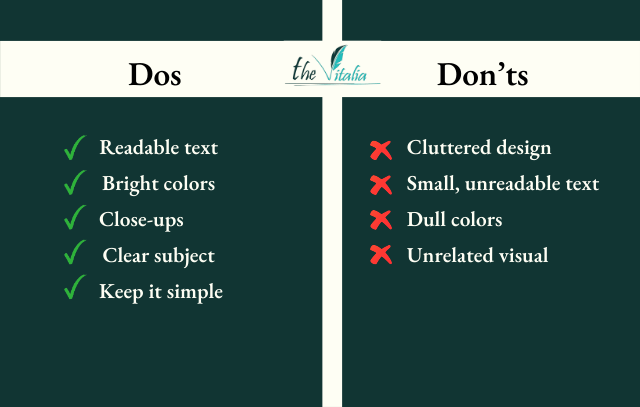
How to Create Eye-Catching Thumbnails
Follow these steps to create thumbnails that tell the true story of your content.
1. Use High-Quality Images
Your thumbnail is like a book cover; the image matters almost as much as the content. Low-quality images suggest to readers that your content has low value. Use clear and crisp visuals for your thumbnails.
2. Bold and Eligible Text
The text on your visuals reinforces what your content is about. Use large fonts that are readable on all screen sizes and devices.
It’s also helpful to apply color contrast for more visibility. A dark background, for example, will do better with bright-colored text and vice versa.
3. Consistent Branding
Many wrongly assume that only medium to big brands must maintain consistent content appearance. This is far from the truth. Having a uniform content look makes your brand stand out.
Choose a color palette and font and stick to them. Also, use the same logo and maintain the same content style for quick recognition.
4. Leverage Faces and Emotions
Where applicable, include faces on your thumbnail. A smiling, frowning or excited face will quickly get your viewer’s attention.
5. Keep it Simple
Avoid the urge to overload your visuals with unnecessary elements or text. Keep it simple and focus on passing one message per thumbnail.
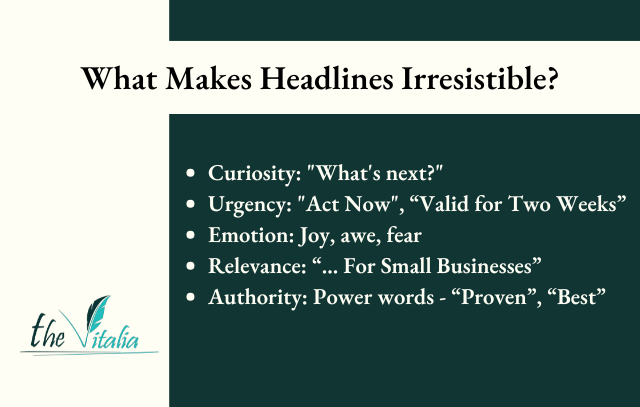
Crafting Compelling Headlines
Use the following methods to create attention-grabbing headlines.
1. Use Workable Language
Motivate and inspire your audience to act by using clear and specific words.
For example, Boost Your Views in 10 Days” or “Master Content Writing Without Stress.” These titles speak to the readers, answer their desires, and provide benefits.
2. Include Numbers and Lists in Your Titles
Numbers in headlines tell viewers the information you share is digestible and practical. That is why listicles are very popular in content creation.
For example, “10 ways …”. Odd numbers are best for listicles because they are more memorable. However, the even number 10 is an exception to this.
3. Create Curiosity or Urgency
Add phrases that create curiosity to your titles to get attention. For example, “The Truth About …”
Also. provocative questions make great headlines, like “Have You Been Making This Mistake?” Also, create urgency by adding a timeframe to your captions.
4. Keep It Short
Short headlines with 50 – 70 characters are ideal for SEO and readability. Viewers quickly lose interest in lengthy titles they can’t easily understand.
5. Personalization
If your content is for a specific group of people, indicate it in your headlines. For example, “Quick Breakfast for Busy Moms” or “Mental Declutter for New Entrepreneurs.”
Personalizing your titles makes your content more relevant to your target audience.
This Might Interest You: 10 Simple Strategies to Improve Readability and Boost Engagement
Tools to Help with Thumbnails and Headlines
With several tools, you can get help with your thumbnails and headlines. I will mention a few.
1. Thumbnail Design Tools
Canva and PicMonkey are great for designing thumbnails. They are easy to use and contain a wide variety of stock photos, videos, and effects.
Also, you can use AI tools like Adobe Express (formerly Adobe Spark) to create fast thumbnails.
2. Headline Optimization Tools
CoScheduler Headline Analyzer can analyze your headlines and make suggestions for Improvement.
3. Testing
Changing your thumbnails is okay if you think it’s not good enough. Try different designs with your title to find the one that works best.
Related Post: Top Writing Tools for Content Creators You Need Right Now
Common Mistakes to Avoid When Creating Thumbnails and Headlines
Certain factors can hurt your visuals and titles even with the best intentions.
1. Overcrowding Thumbnails
Adding too many elements, whether text or images, to your thumbnail, can distract your viewers. Also, too many words and clutter repel viewers.
While putting as much information as possible on titles and thumbnails is tempting, simplicity wins.
2. Deceitful Headlines
Misleading your audience with clickbait will affect your credibility. Be sincere in your title and ensure your content delivers on your title promise.
3. Inconsistent Branding
Using different fonts, visuals, colors, and logos will make you lose your reader’s trust. Be consistent by using the same content style and features for your message.
In Case You Missed It: The Power of Using Visuals to Enhance Your Content Strategy
Give Your Audience the Best Glimpse
A good headline and visuals can significantly boost your views and engagement. Use these tips to master how to create eye-catching thumbnails and headlines.
Don’t let viewers overlook your quality content. Give your content a befitting front and show your audience it is worth their time.
Frequently Asked Questions
1. Why is it Important to Learn How to Create Eye-catching Thumbnails and Headlines?
Thumbnails and headlines are your audience’s first point of contact. A good thumbnail and headline can grab attention and increase your content’s visibility.
2. How Do I Create a Compelling Headline Without Deceit?
Pique your viewer’s curiosity, trigger their emotions, and add numbers and benefits to your titles.
For example, instead of “How to Ferment Wine,” write “5 Simple Steps to Ferment Wine at Home.”
3. Can I Include Text in My Thumbnails?
Yes, but make it short and easy to read.
4. Can I Create a Good Thumbnails Myself?
You can use tools like Canva, PicMonkey, or Adobe Express to create eye-catching thumbnails.
5. Do Thumbnails and Headlines Have to Align?
Your thumbnail must complement your title to maintain consistency.
However, don’t mislead with your thumbnails or headlines for clicks.


Leave a comment